RAG-ready PDF extraction with JSON, Markdown, and bounding boxes
Parse complex PDFs into structured data for search, RAG, document review, and AI workflows while preserving reading order, page references, and layout context. Built for Accessible, Searchable, and RAG-Ready document systems.
{
  "task_id": "task_...",
  "status": "SUCCESS",
  "document_id": "doc_...",
  "elements": [
    {
      "id": "el_1",
      "type": "heading",
      "heading_level": 1,
      "content": "Executive Summary",
      "page_number": 1,
      "bbox": [72, 96, 520, 130],
      "bounding_box": [72, 96, 520, 130]
    }
  ],
  "reading_order": ["el_1", "table_p2_1"],
  "tables": [
    {
      "id": "table_p2_1",
      "rows": [["Metric", "Value"]],
      "row_count": 1,
      "column_count": 2,
      "bbox": [72, 160, 520, 220]
    }
  ],
  "markdown": "# Executive Summary\n\n| Metric | Value |"
}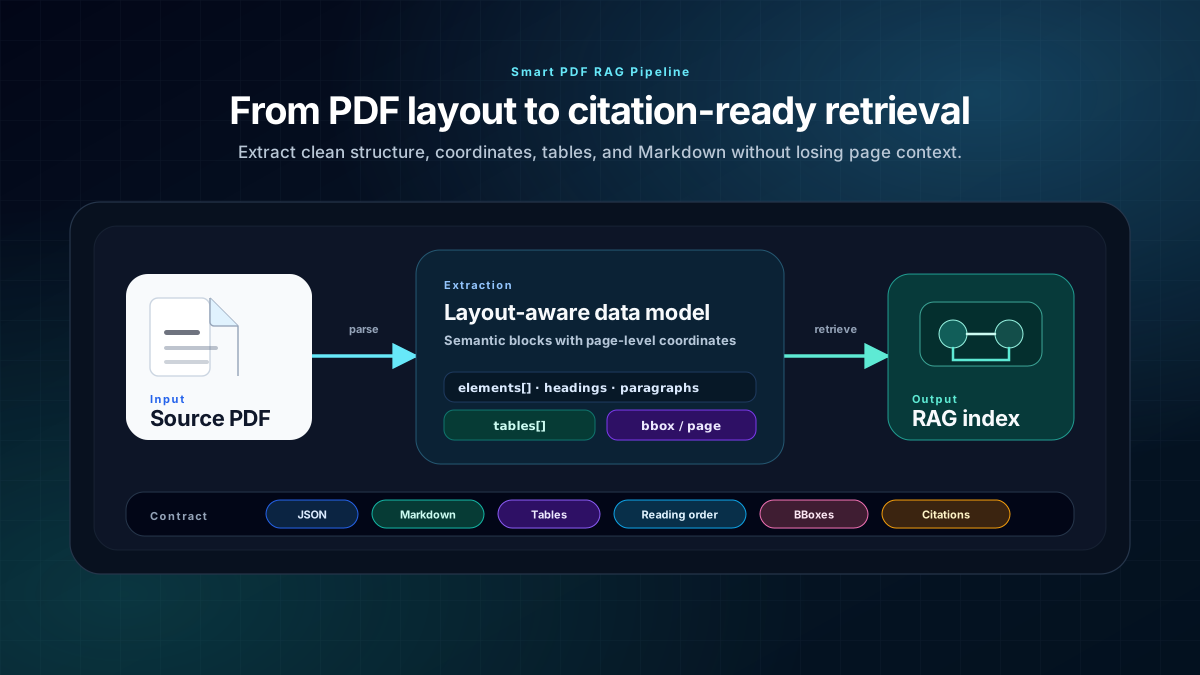
Layout-aware extraction for RAG and citations
The Smart PDF RAG workflow keeps the relationship between extracted content and the source PDF, including page references, reading order, tables, and bounding boxes.
Best for developers building PDF search, RAG, and document review workflows
Use Smart PDF RAG when the PDF structure matters: users need searchable text, machine-readable JSON, LLM-friendly Markdown, source citations, and layout metadata tied to the original pages.
Developers building PDF search or RAG
Use structured JSON, Markdown, reading order, page numbers, and bounding boxes to build retrieval pipelines that can cite the source PDF instead of storing anonymous plain text.
Search teams that need page-level evidence
Keep each extracted element tied to a page and coordinate region so search results, generated answers, and reviewers can jump back to the original document context.
Document intelligence teams
Extract headings, paragraphs, lists, tables, figures, and metadata as typed elements for downstream review, indexing, analytics, and automation workflows.
Teams that also care about accessibility
The same structural signals that help RAG—headings, reading order, tables, alt text, and clean text—also support accessible, searchable, and RAG-ready document workflows.
When a simpler PDF workflow may be enough
The Smart PDF RAG pipeline is optimized for structured extraction and retrieval systems. It is not the right fit for every PDF task.
Simple text-only extraction
If you only need a one-off text dump and do not need layout, citations, tables, or page references, a basic extractor may be enough.
One-off manual reading
If a human only needs to read a single PDF once, a structured parsing API may add more workflow than needed.
Workflows without provenance requirements
If users never need to see where an answer came from, bounding boxes and reading order may not be critical.
Use layout-aware extraction where plain text breaks down
Flat PDF text extraction loses the structure retrieval systems need for strong citations. Smart PDF RAG preserves source context so applications can retrieve the right section, show the source page, and highlight evidence in a PDF preview.
Enterprise knowledge search
Index policies, reports, contracts, manuals, statements, and handbooks with heading-aware chunks and source page links.
Cited RAG answers
Store page_number, bbox, and bounding_box metadata so generated answers can show evidence in the source PDF.
Document review copilots
Let reviewers inspect extracted elements beside the original page region instead of trusting ungrounded summaries.
Table-heavy document ingestion
Preserve table rows, columns, page context, and coordinates for filings, schedules, statements, and operational reports.
Fields built for RAG, review, and citations
Completed parse responses are designed for ingestion pipelines, vector indexing jobs, review interfaces, and document intelligence applications.
See API exampleselements[]
Typed blocks such as heading, paragraph, list item, table, figure, and link elements.
page_number
The source page for each element and table so downstream results can cite the PDF location.
bbox / bounding_box
Coordinate arrays that connect extracted content back to the original page region.
reading_order
An ordered list of element IDs for safer chunking across headings, body text, sidebars, and tables.
tables[]
Top-level table data with rows, row_count, column_count, and source coordinates where available.
markdown
LLM-friendly Markdown generated from the same structured elements and tables.
POST /api/v1/parse, then poll /api/v1/parse/status/{task_id}
The current public API uses an async task flow. Submit the PDF once, store the returned task_id, then poll the status endpoint for SUCCESS and the completed structured output.
View full API docsCreate a server-side API key
Keep the key out of browser code and send it as X-API-Key from your backend ingestion job.
POST the PDF
Upload a multipart PDF to /api/v1/parse. The API returns task_id, document_id, status, page_count, and file_size_bytes.
Poll task status
Call /api/v1/parse/status/{task_id} until the Celery task state is SUCCESS or returns an error.
Index structured output
Store elements, Markdown, tables, reading_order, page_number, bbox, and bounding_box fields with your search chunks.
Give agents structured source context instead of isolated text
Agent workflows are stronger when every summary, answer, or review suggestion can be traced back to structured PDF elements and source coordinates.
Agent-assisted intake
Parse uploaded PDFs, ask an agent to summarize sections from Markdown, and keep JSON element IDs for traceability.
Grounded answer review
When an agent drafts an answer, show the cited page and bbox region so a human can verify the source.
Accessibility-aware triage
Use structure signals such as headings, reading order, tables, figures, and text quality to route documents for accessibility or RAG cleanup.
Smart PDF RAG FAQ
These visible answers match the page positioning and current async Parse API behavior.
What is Smart PDF RAG?+
Smart PDF RAG turns PDFs into structured JSON and Markdown with reading order, headings, tables, page references, and bounding boxes so retrieval systems can chunk and cite PDF content more reliably than flat text extraction.
Does the API return bounding boxes?+
Yes. Parsed elements can include bbox and bounding_box coordinate fields so applications can connect extracted content back to the original PDF page for citations, highlighting, and review workflows.
How do developers access the Parse API?+
Developers create an API key in the workspace, submit a PDF to the async parse endpoint with X-API-Key, and poll the status endpoint for completed JSON, Markdown, tables, reading order, and layout metadata.
Ready to add layout-aware PDF parsing?
Compare plans for Smart PDF RAG pages, API usage, workspace keys, and team access.