Accessible, Searchable, and RAG-Ready
PDFAccessibility.ai combines an AI PDF accessibility checker, AI PDF remediation workspace, and Smart PDF RAG API so teams can audit, fix, and structure PDFs in one platform.
PDF Accessibility Engine
WCAG, PDF/UA, and Section 508 checking, remediation, manual edit fallback, and accessible PDF export.
Smart PDF RAG Pipeline
JSON, Markdown, headings, reading order, tables, and bounding boxes for developer ingestion workflows.
{
  "status": "analyzing",
  "accessibility_score": 78,
  "issues": [
    "missing_alt_text",
    "heading_hierarchy",
    "table_headers"
  ],
  "exports": ["tagged_pdf", "json"]
}benefits_handbook.pdf
Generating alt text…
BUILT FOR COMPLIANCE WITH
Engineered for precision
The platform goes beyond simple OCR by understanding document semantics, accessibility structure, and AI ingestion requirements.
Deterministic Structural Parsing
Map complex PDF layouts into headings, paragraphs, lists, tables, figures, bounding boxes, and reading order for assistive technology and AI systems.
Multimodal Alt Text
Generate contextual alt text for charts, figures, diagrams, and screenshots, then attach it to the remediation workflow.
RAG-Ready Markdown & JSON
Export clean structured content, table matrices, and layout metadata for search, LLM apps, and retrieval-augmented generation.
WCAG / PDF-UA Validation
Identify compliance barriers mapped to WCAG, PDF/UA, Section 508, ADA, and EN 301 549 expectations.
Diagrams and previews that explain the product workflow
High-quality, crawlable visual assets support image search, AI Search previews, and users who need to understand how PDF accessibility and Smart PDF RAG fit together.
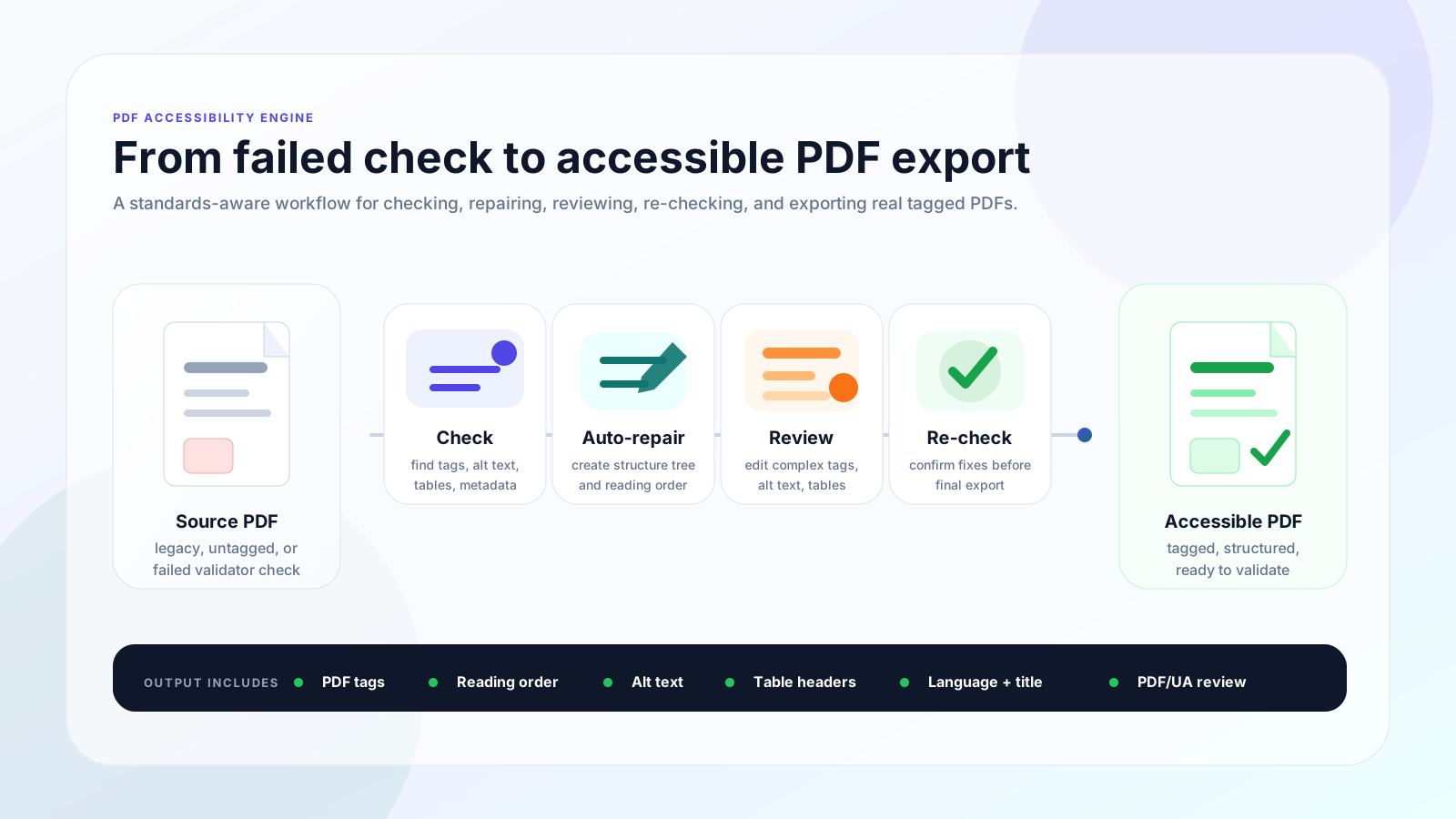
PDF accessibility workflow
The remediation path is visible: diagnose barriers, repair document structure, review complex elements, then export a corrected PDF.
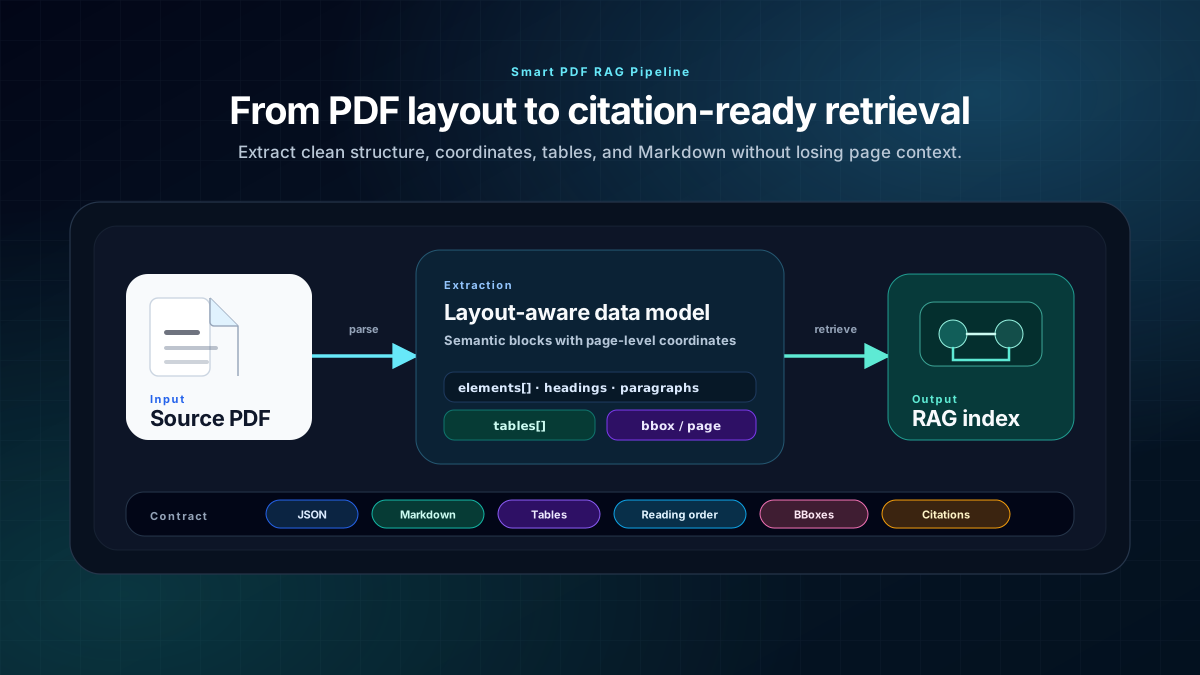
Smart PDF RAG pipeline
Layout-aware extraction keeps headings, tables, page references, and bounding boxes available for search and retrieval systems.
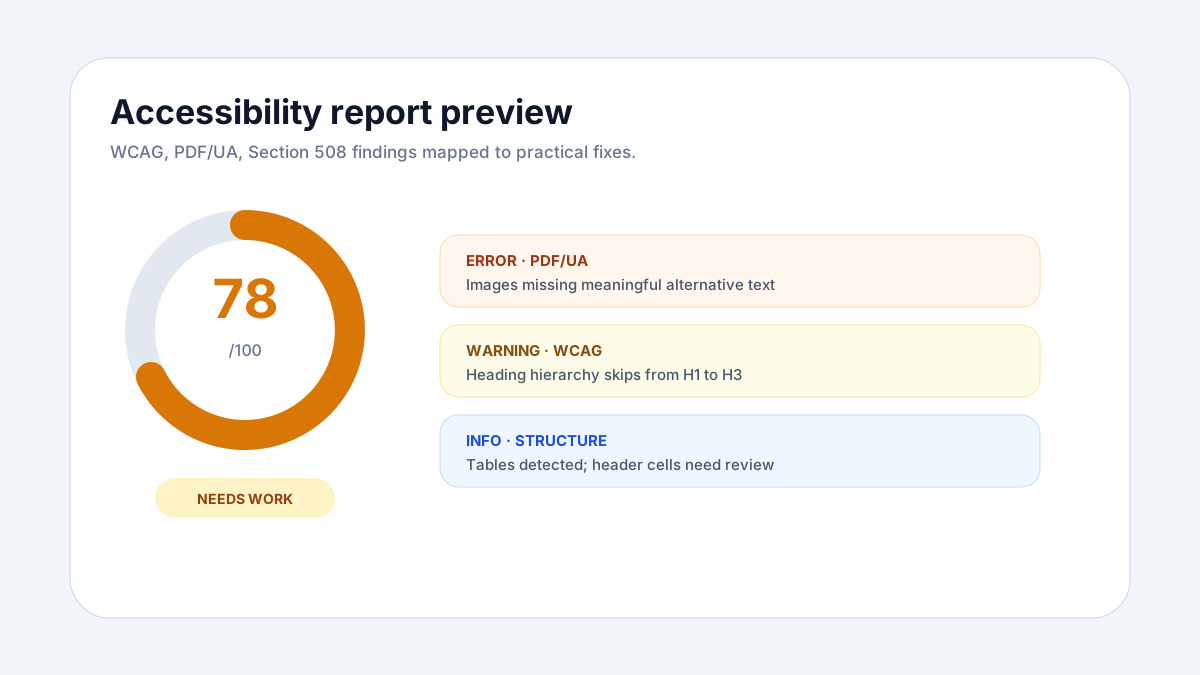
Checker report preview
The public checker explains findings in crawlable page content and routes real fixes into the remediation workspace.
Developer-first remediation workspace
Inspect document structures, debug tagging issues, and view live JSON/Markdown outputs side-by-side with your original PDF source.
- ✓ Live document tree inspection
- ✓ Automated WCAG/PDF-UA validation
- ✓ Real-time JSON and Markdown preview
- ✓ API-first Smart PDF RAG pipeline
DOCUMENT TREE
<Document>
<H1> Executive Summary
<Table>
<TR> <TH> <TD>
<Figure> Missing Alt
{
  "score": 96,
  "status": "remediated",
  "exports": {
    "tagged_pdf": true,
    "markdown": true,
    "json": true
  }
}
Free PDF utility tools
Lightweight acquisition tools. Core paid product remains accessibility remediation and Smart PDF RAG.
PDF accessibility remediation questions
Answers for teams that need fast, standards-aware PDF remediation with a practical manual review path for complex documents.
What is an accessible PDF?+
An accessible PDF is a properly tagged PDF with reading order, headings, lists, tables, image alternative text, document language, metadata, and structure that assistive technologies such as screen readers can understand.
How do I check whether my PDF is accessible?+
Use the free PDF accessibility checker to upload a PDF and get a report mapped to WCAG, PDF/UA, Section 508, ADA, and EN 301 549 signals. The checker reports issues first; remediation and export happen after signup in the workspace.
How fast is PDF remediation?+
PDFAccessibility.ai converts most PDFs into accessible tagged PDFs in seconds. The engine is built for high-speed remediation and batch workflows, so teams can process far more documents than manual-only approaches.
How accurate is the automatic PDF remediation?+
Our automated remediation is designed to be about 90% accurate across most common PDFs. Complex layouts, unusual tables, scanned pages, or ambiguous reading order can be flagged for manual review instead of pretending the file is finished.
What happens when a PDF is too complex for full automation?+
Complex PDFs are sent through an easy manual edit workflow where users can inspect the PDF, review tags and issues, edit content or alt text, re-check the file, and export a ready accessible PDF.
Can every PDF be fully remediated automatically?+
Most PDFs can be remediated automatically. Some files still need the manual editor for simple fixes such as accessible text, tag roles, or reading order. A smaller set of issues, like text contrast or visual design problems, must be corrected in the source document by the PDF creator; when that happens, we show the exact page, element, and issue so the creator can fix it quickly and re-export.
Which accessibility standards are supported?+
The platform checks and remediates against major PDF accessibility expectations including PDF/UA, WCAG, Section 508, ADA, and EN 301 549. The checker also explains issues in practical language so teams know what needs to be fixed.
Do I need the original Word, PowerPoint, or InDesign source file?+
No. The remediation workflow is designed for existing PDFs, including legacy documents where the original source file is unavailable. Source files can help in some cases, but they are not required for most PDFs.
Is my document secure during processing?+
Documents are processed for accessibility analysis and remediation. For production accounts, the platform should use authenticated workspaces, secure transport, access controls, and retention policies appropriate for business documents.
Can developers use the same PDF structure for RAG?+
Yes. In addition to accessibility remediation, the developer API returns structured JSON and Markdown with reading order, headings, tables, bounding boxes, and content hierarchy for search and RAG pipelines.
Ready to fix inaccessible PDFs?
Use the free checker to diagnose issues, then sign up to remediate, re-check, and export accessible PDFs.