Parse API for Accessible, Searchable, and RAG-Ready PDFs
Upload a PDF, poll the parse job, and receive RAG-ready JSON, Markdown, tables, reading order, and bounding boxes.
Best for structured PDF search, RAG, review, and citations
Use the Developer API when downstream users need searchable text plus source context: JSON elements, Markdown, tables, reading order, page references, and layout coordinates.
RAG ingestion
Build chunks from headings, reading order, page references, and Markdown instead of arbitrary fixed-size plain text splits.
Cited answers
Store page_number, bbox, and bounding_box fields so generated answers can link back to the exact PDF region.
Table retrieval
Extract table rows, row counts, column counts, and source coordinates from statements, reports, schedules, and filings.
Human review
Show extracted elements next to the original PDF page for validation, quality assurance, and audit workflows.
Use a different path when the API adds unnecessary complexity
The API is built for server-side, repeatable document intelligence workflows. These cases usually need a simpler or different implementation path.
Client-side browser calls
API keys should stay server-side. Use your backend or ingestion worker rather than exposing keys in frontend JavaScript.
Tiny one-off text dumps
If you only need quick text from one simple PDF, a basic extractor may be enough. The API is built for structured, repeatable workflows.
Webhook-only architectures
The current documented baseline is polling the status endpoint. Do not design around webhook delivery unless a supported integration is explicitly enabled.
Need to fix PDFs instead of parsing them?
The Smart PDF RAG API is a separate paid product for structured data extraction. If your goal is an accessible exported PDF, use the AI PDF accessibility checker to diagnose issues and the AI PDF remediation workspace to repair, manually review, and export the corrected file.
POST /api/v1/parse
curl -X POST https://pdfaccessibility.ai/api/v1/parse \
  -H 'X-API-Key: $PDFACCESSIBILITY_API_KEY' \
  -F "[email protected]"
This endpoint starts an async parse job and returns a task_id. Poll /api/v1/parse/status/{task_id} for completed output. Need an API key? Review the authentication overview below.
Authenticate with X-API-Key from a server-side workflow
The backend dependency requires an X-API-Key header. Keep keys private and send requests from trusted backend services or ingestion workers.
Header
Send X-API-Key with each /api/v1/parse and /api/v1/parse/status/{task_id} request.
Storage
Store keys in server-side environment variables or a secrets manager, not in public browser bundles.
Roles
The API is intended for workspace users with owner or developer access to the organization.
Rotation
If a key is exposed, revoke or rotate it and update the service that sends parse requests.
From PDF upload to RAG-ready indexed content
The current API is designed for async processing: submit the file once, poll job status, then store structured output with provenance for retrieval, citations, and review.
Create an API key
Use the workspace API keys screen to create a key. The raw key is shown once, then stored masked for safety.
Submit the PDF
Send a multipart PDF upload to the parse endpoint with the X-API-Key header. The API returns task_id, document_id, status, page_count, and file_size_bytes.
Poll for completion
Call /api/v1/parse/status/{task_id} until the job returns SUCCESS and structured document output, or an error if processing fails.
Index with provenance
Use elements, Markdown, tables, reading_order, page numbers, and bounding boxes in your search, RAG, or review pipeline.
Initial response
{
  "task_id": "task_...",
  "document_id": "doc_...",
  "status": "processing",
  "page_count": 12,
  "file_size_bytes": 248391
}
GET /api/v1/parse/status/{task_id}
Poll this endpoint with the same X-API-Key header until status is SUCCESS. Completed responses include structured JSON elements, generated Markdown, reading_order, tables, bbox, and bounding_box fields.
{
  "task_id": "task_...",
  "status": "SUCCESS",
  "document_id": "doc_...",
  "document": {
    "id": "doc_...",
    "filename": "report.pdf",
    "page_count": 12,
    "status": "processed",
    "accessibility_score": 96
  },
  "elements": [
    {
      "id": "el_1",
      "type": "heading",
      "content": "Executive Summary",
      "page_number": 1,
      "bbox": [72, 96, 520, 130],
      "bounding_box": [72, 96, 520, 130],
      "heading_level": 1
    }
  ],
  "reading_order": ["el_1", "table_p2_1"],
  "tables": [
    {
      "id": "table_p2_1",
      "rows": [["Metric", "Value"], ["Revenue", "$4.2B"]],
      "row_count": 2,
      "column_count": 2,
      "bbox": [72, 160, 520, 220]
    }
  ],
  "markdown": "# Executive Summary\n\n| Metric | Value |\n| --- | --- |\n| Revenue | $4.2B |"
}Fields in the documented async response
These fields mirror the current parse endpoint and status response shape used by the backend.
task_id
Returned immediately by POST /api/v1/parse and used to poll the status endpoint.
document_id
The created document record ID returned on submission and included in completed status responses.
status
The async task state. Completed examples use SUCCESS. Failed jobs may include an error field.
document
Completed responses include filename, page_count, document status, and accessibility_score when available.
elements[]
Normalized typed content elements with IDs, content, type, page_number, bbox, and bounding_box where available.
reading_order
Ordered element IDs that help chunkers preserve page structure.
tables[]
Top-level table rows with row_count, column_count, and source coordinates where available.
markdown
Generated Markdown for LLM-friendly ingestion and retrieval workflows.
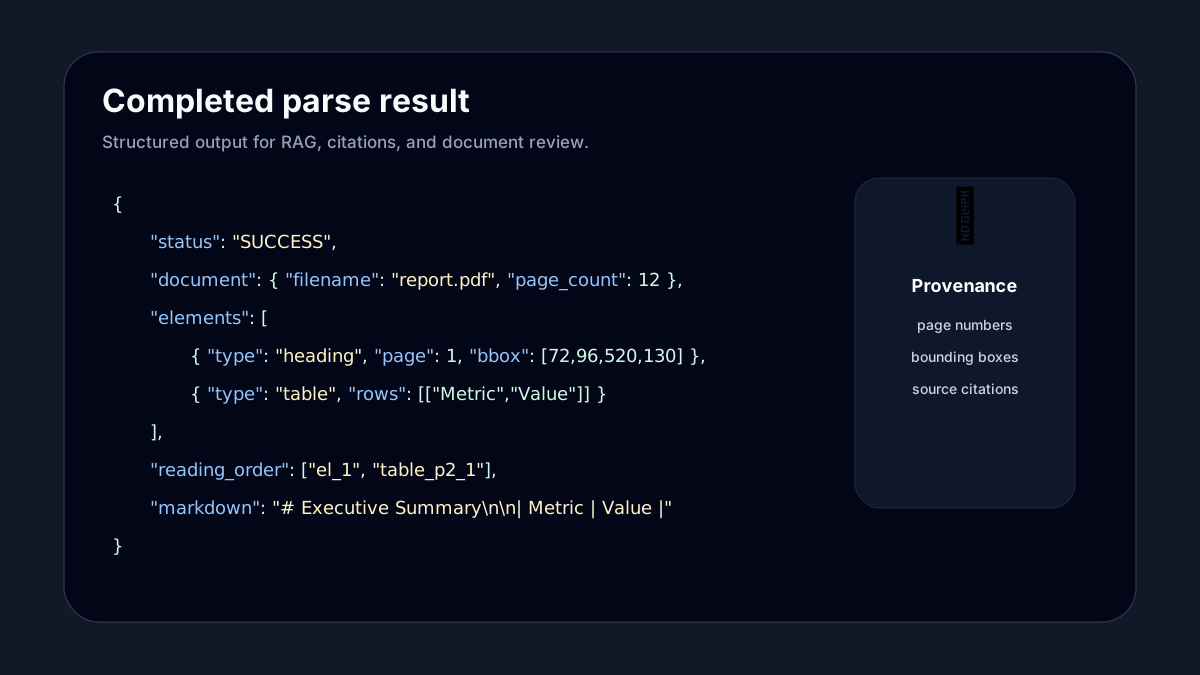
API response example as a visible visual asset
The API documentation includes both crawlable code examples and a meaningful image preview with descriptive alt text for image SEO and agent-friendly interpretation.
Polling is the documented baseline for completed parse output
The parse request dispatches an async worker task and returns quickly with a task_id. Your application should poll the status endpoint until the task finishes, then index the completed output. Webhook delivery is not documented as the default integration path.
Keep task IDs
Persist task_id and document_id so retries, logs, and downstream indexing jobs can trace each PDF.
Store source metadata
Keep filename, page count, and page-level references beside each chunk for user-facing citations.
Chunk by structure
Use headings, reading_order, and table boundaries before falling back to token-length chunking.
Protect keys
Use server-side calls, rotate keys when needed, and avoid exposing API keys in client-side code.
Build agent workflows that preserve source evidence
Agents can summarize, route, and draft answers from PDF content, but production workflows should keep every answer tied to document_id, page_number, and coordinates for review.
Grounded answer agent
Parse a PDF, index Markdown and JSON elements, then require the agent to return page_number and bbox metadata with every cited answer.
Reviewer copilot
Show an agent-suggested summary beside the extracted element and source page region so a human can accept, edit, or reject it.
RAG ingestion monitor
Use task_id, document_id, and status polling to coordinate ingestion jobs that parse PDFs, create chunks, embed content, and record source provenance.
Plans
Compare all plansDeveloper API FAQ
These visible answers match the structured data on this page and the current async Parse API behavior.
What does the Smart PDF RAG API return?+
The Parse API returns structured PDF output including typed elements, Markdown, table rows, reading order, page numbers, and bounding boxes that connect extracted content back to the source PDF.
How do API keys work?+
Developers create API keys inside the workspace. Keys are shown once, then masked for safety. Requests authenticate with the X-API-Key header.
Is PDF parsing synchronous or asynchronous?+
Parsing starts as an asynchronous job. Submit a PDF to the parse endpoint, store the task_id, then poll /api/v1/parse/status/{task_id} until the structured JSON and Markdown output is ready.