AI PDF Accessibility Checker
Upload a PDF for an AI-assisted WCAG, PDF/UA, and Section 508 report with no signup for checking. The checker diagnoses accessibility barriers; the workspace remediates and exports corrected PDFs.
Drag & drop your PDF here
or click to browse from your computer. Free checker max 10MB.
Free AI PDF checker for WCAG, PDF/UA, Section 508, ADA, and EN 301 549
Use the free AI PDF accessibility checker to quickly understand whether a document has the structure screen readers and compliance workflows expect. The report highlights tagged PDF structure, reading order, headings, image alt text, tables, document metadata, language, and other signals that commonly cause failed industry PDF/UA validator checks.
The public checker is intentionally report-first: it shows what is wrong before changing your file. When you are ready to fix issues, the workspace can auto-remediate most PDFs in seconds, flag complex documents for manual review, and export a corrected accessible PDF that can be re-checked externally.
What the AI PDF accessibility checker looks for
The checker combines document parsing with accessibility-oriented analysis so teams can see which issues need remediation before they publish, archive, or send a PDF for review.
Tags and structure tree
Whether the PDF exposes headings, paragraphs, lists, links, figures, and tables as meaningful tagged structure.
Reading order
Whether the logical reading sequence is likely to match the visual document order for assistive technology.
Headings and landmarks
Whether heading levels and document organization are present and useful for navigation.
Image alt text
Whether figures have meaningful alternative text or can be marked decorative when appropriate.
Tables and metadata
Whether table headers, document language, title, and PDF/UA-oriented metadata signals are present.
WCAG, PDF/UA, Section 508 issues
Whether common accessibility barriers should be fixed before publishing or sharing the PDF.
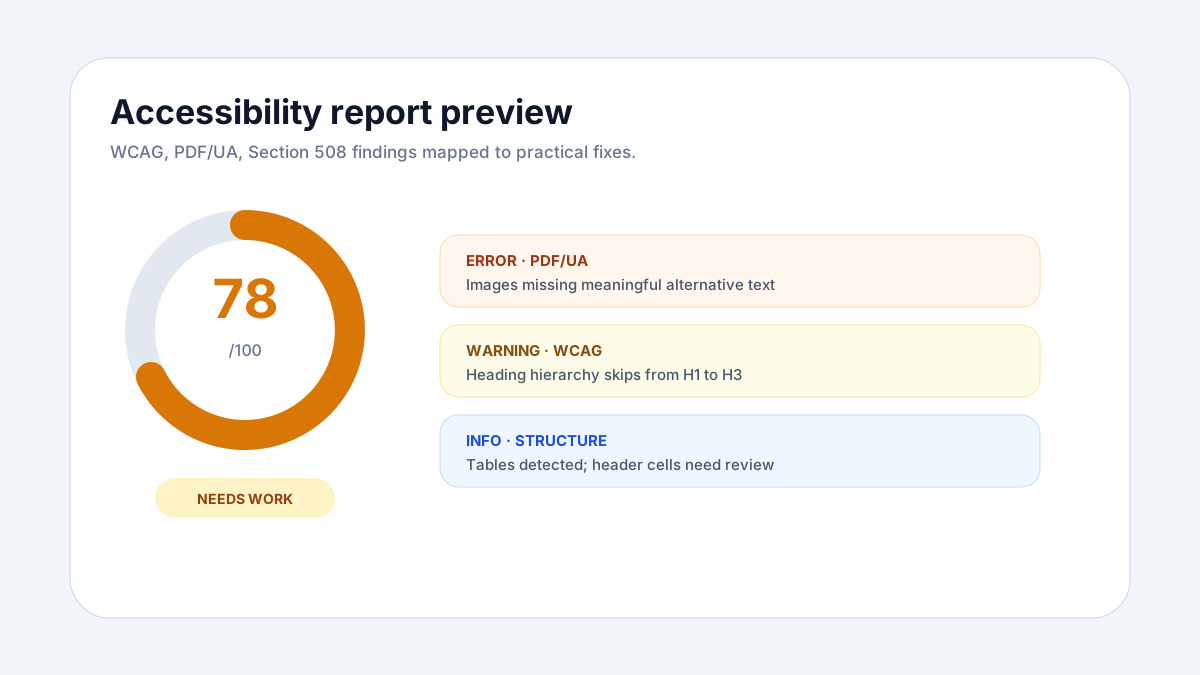
Checker result screenshot preview
The report preview shows how checker results are organized: score, standards mapping, identified barriers, and the next remediation step.
WCAG PDF checks
Identify barriers related to structure, text alternatives, headings, labels, reading order, and usability for assistive technology.
PDF/UA signals
Look for tagged PDF structure, document language, metadata, logical headings, tables, figures, links, and common PDF/UA validator failures.
Section 508 and ADA readiness
Surface issues that create risk for public-sector, education, healthcare, finance, and enterprise document programs.
EN 301 549 alignment
Review PDF accessibility expectations relevant to European public-sector and procurement requirements.
PDF accessibility issues the AI checker looks for
The scan focuses on practical document barriers that affect screen reader users, keyboard users, compliance reviewers, and teams preparing PDFs for accessible publishing or RAG-ready extraction.
From AI PDF accessibility checker report to corrected accessible PDF
A failed PDF accessibility check should lead to a real repaired file, not just a better dashboard score. PDFAccessibility.ai is built around report, AI PDF remediation, manual review, re-check, and export.
Check the PDF
Upload a PDF and get a free report showing accessibility barriers, standards mapping, affected pages, and practical remediation guidance.
Auto-remediate in seconds
Create a free workspace account to run automated tagging, structure repair, alt text assistance, and re-checks. The engine is about 90% accurate for most PDFs.
Manually review complex PDFs
When automation flags review items, use the manual editor to inspect elements, adjust tags, edit alt text, fix reading order, re-check, and export an accessible PDF.
Free PDF accessibility checker FAQ
The checker gives you the report first. Remediation, manual edits, re-checking, and export happen after signup in the workspace.
What does the AI PDF accessibility checker test?+
The AI PDF accessibility checker scans PDF accessibility signals related to WCAG, PDF/UA, Section 508, document structure, tags, headings, images, tables, metadata, language, reading order, and common PDF/UA validator failures.
Does the free checker fix my PDF automatically?+
No. The public checker only provides an accessibility report. To remediate and download corrected accessible PDFs, create a free workspace account first.
What happens after the report finds issues?+
Sign up for the workspace to auto-remediate the PDF in seconds, re-check the result, manually review complex items if needed, and export a ready accessible PDF.
How accurate is the remediation workflow?+
The remediation engine is designed to be about 90% accurate for most PDFs. Complex documents are flagged for manual review so users can make targeted edits instead of relying on a false pass.
Can I manually edit the PDF if automation flags review items?+
Yes. The workspace includes an easy manual editor where users can inspect the PDF, select elements, edit tags/content/alt text, re-check, and export the corrected accessible PDF.
Can every failed check be fixed automatically?+
Most PDFs can be remediated automatically. Some files still need the manual editor for simple fixes such as accessible text, tag roles, or reading order. A smaller set of issues, like text contrast or visual design problems, must be corrected in the source document by the PDF creator; when that happens, we show the exact page, element, and issue so the creator can fix it quickly and re-export.
Which tags and structures are checked?+
The checker looks for core accessibility structures such as headings, paragraphs, lists, links, figures, tables, alt text, reading order, document language, tagged PDF structure, and PDF/UA metadata.
How is this different from a PDF/UA validator?+
An industry PDF/UA validator focuses on technical compliance. This AI PDF accessibility checker explains accessibility barriers in a web report and routes remediation into the workspace where automatic tagging and manual review can be completed.
How much does the checker cost?+
The accessibility checker is free for quick reports. Remediation, saved workspace history, batch workflows, and export features belong in the signed-in plans, including a free signup tier.