PDF Accessibility Remediation Checklist: What to Fix Before You Export
Use this PDF accessibility remediation checklist to fix tags, headings, reading order, alt text, tables, forms, metadata, and final export verification.
Is this the right page for your question?
- Main question answered here
- Pre-export task list — the ordered fixes to complete before you export the PDF
- Best for
- Anyone actively remediating a file who needs a sequence of fixes to work through
- ✓Tags, headings, reading order, alt text, tables, forms, links, language, and artifacts
- ✓The order that avoids rework
- ✓Where each item ends and export begins
- How to verify a remediated PDF — You have finished the fixes and now need to prove the exported file is correct.
- Validate PDF/UA, WCAG and Section 508 — You need to know which standard a stakeholder is actually asking you to satisfy.
- Manual vs automated PDF remediation — You have not yet decided which items to automate and which to fix by hand.
PDF remediation checklist summary
| Area | What to verify | Why it matters |
|---|---|---|
| Tags | A logical tag tree exists with document, heading, paragraph, list, table, and figure roles where appropriate | Tags are the structure that screen readers, validators, search systems, and extraction pipelines inspect |
| Headings | Heading levels follow the document outline instead of only using bold or large visual text | Good headings improve navigation, comprehension, search, and RAG chunking |
| Reading order | The tagged reading sequence matches the intended human reading flow | Reading order affects screen readers, keyboard workflows, extraction quality, and citation reliability |
| Alt text | Meaningful images have useful descriptions, decorative images are handled intentionally, and alt text is written into the exported PDF | Image access depends on real PDF structure, not notes that live only in a UI |
| Tables and forms | Tables expose headers and relationships; forms expose labels, tooltips, and tab order | Structured data and interactive fields need semantics beyond visual placement |
| Export | The final exported PDF is re-checked with an industry PDF/UA validator or equivalent process | External verification confirms the artifact itself was physically fixed |
Start with the final goal: a fixed exported PDF
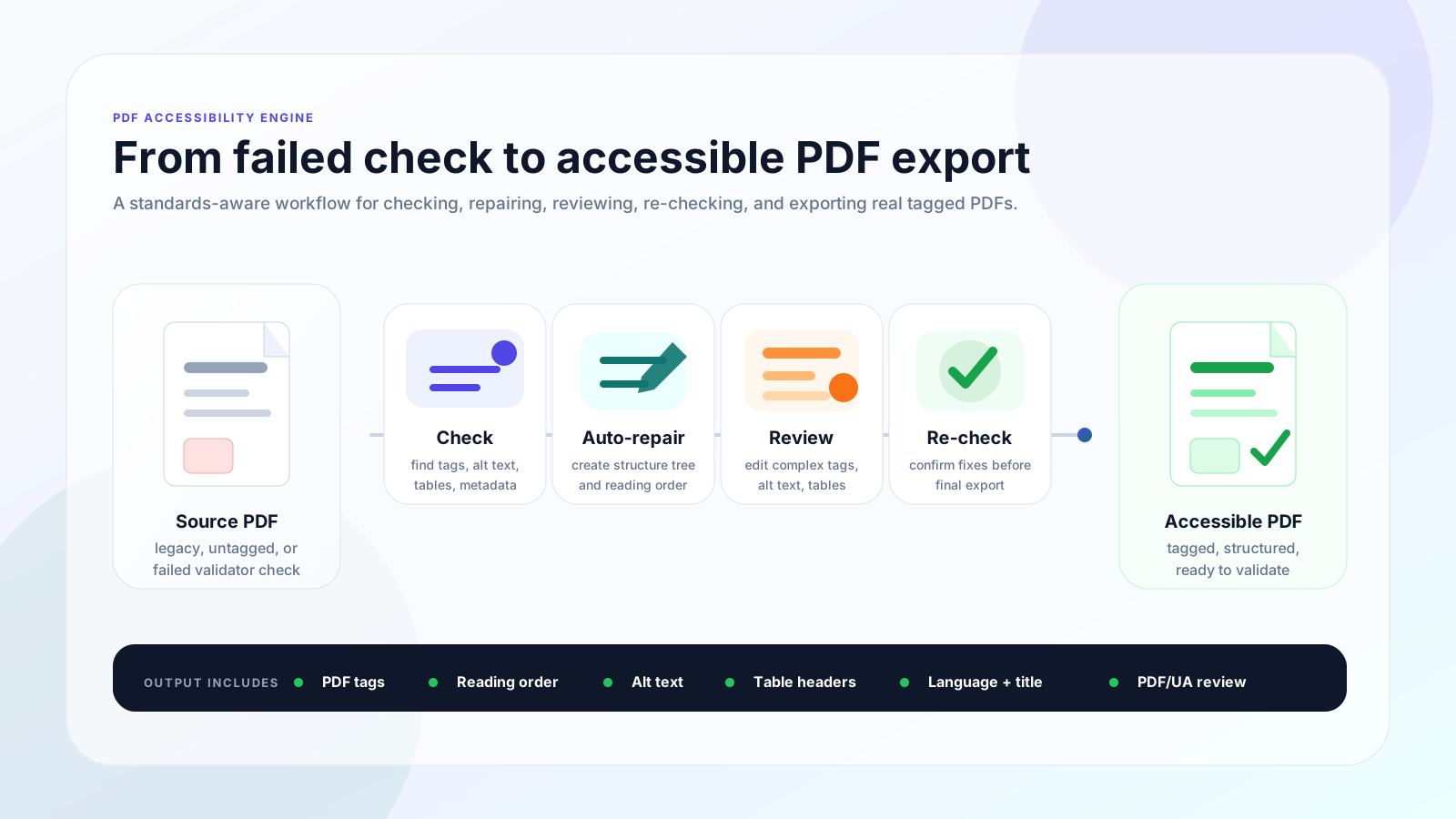
Accessibility checking is only the first step. A checker can tell you that a PDF has missing tags, broken reading order, missing alt text, or table problems, but remediation means changing the PDF structure so the exported file is usable.
The goal is an accessible, searchable, and RAG-ready PDF: a document with meaningful tags, logical order, useful metadata, and structure that assistive technology, validators, search systems, and developer pipelines can inspect.
1. Confirm the PDF has a real tag structure
A visually formatted PDF is not necessarily a tagged PDF. Tags identify the logical document structure: headings, paragraphs, lists, tables, figures, links, and artifacts.
If the tag tree is missing or badly broken, screen readers and validators may not be able to understand the document even if it looks correct on screen.
- ✓Document-level structure exists
- ✓Paragraphs, headings, lists, tables, and figures use appropriate roles
- ✓Important content is included in the tag tree
- ✓Decorative content does not interrupt the reading flow
2. Fix heading structure
Headings should describe the document outline, not just the visual style. A bold or large line of text is not enough if the exported PDF does not identify it as a heading.
Check for one logical top-level heading where appropriate, nested heading levels in the right order, and headings that accurately match the content below them.
- ✓One logical H1 where appropriate
- ✓No skipped heading levels without a structural reason
- ✓No fake headings made only with visual styling
- ✓Headings support navigation and chunking
3. Repair reading order
Reading order is the sequence in which assistive technology and extraction systems encounter the content. Multi-column layouts, sidebars, repeated headers, footers, and callouts often look fine visually while producing a confusing reading sequence.
A good remediation workflow checks the order in the exported PDF, not only the visual placement on the page.
- ✓Main content follows the intended sequence
- ✓Sidebars and callouts are placed where they make sense
- ✓Headers, footers, and page numbers do not interrupt the flow
- ✓Tables and figures appear near their related context
4. Add meaningful image alt text
Meaningful images need descriptions that explain their purpose in context. Decorative images should be intentionally treated as decorative instead of receiving noisy descriptions.
The important detail is where the alt text is stored: it must be written into the correct Figure structure in the exported PDF, not only saved as a note, annotation, database row, or UI field.
- ✓Describe meaningful images in one useful sentence when possible
- ✓Mark purely decorative images appropriately
- ✓Use richer nearby explanations for charts or diagrams when needed
- ✓Verify alt text exists in the final PDF structure
5. Check tables for headers and relationships
Tables need more than visual rows and columns. Header cells, row and column relationships, and table scope can determine whether a screen reader user can understand the data.
Simple tables can often be remediated quickly. Complex tables with multi-level headers, merged cells, or unusual layouts usually deserve manual review.
- ✓Header cells are identified
- ✓Row and column relationships make sense
- ✓Layout tables are avoided or handled carefully
- ✓Complex tables are flagged for manual review
6. Make links, annotations, and forms accessible
Links should be descriptive and map cleanly to tagged content. Interactive PDFs also need labels, tooltips, required-field indicators, and a logical tab order.
If a form appears usable visually but the exported PDF lacks form metadata, the remediation is incomplete.
- ✓Link text explains the destination or action
- ✓Link annotations are associated with tagged content
- ✓Form fields have labels and tooltips
- ✓Tab order follows the intended workflow
7. Set document language, title, and metadata
Metadata is not a substitute for real tagging, but it is still part of a complete remediation checklist. Document language and title help assistive technology and review tools interpret the file correctly.
Bookmarks can also help users navigate longer PDFs when they match the document structure.
- ✓Document language is set
- ✓Document title is present and meaningful
- ✓Bookmarks are useful for longer files
- ✓Metadata matches the final exported artifact
8. Remove or fix artifacts
Repeated headers, footers, decorative rules, background shapes, and page numbers can create noise if they are exposed as regular content in the reading order.
At the same time, important content should not be incorrectly marked decorative. Remediation requires deciding what should be read and what should be skipped.
9. Export and verify the final PDF
The final checklist item is the most important one: export the remediated PDF and verify that file. An internal score is helpful for workflow tracking, but it does not prove the distributed artifact is accessible.
Manual edits and automated fixes must physically update the exported PDF. If an industry PDF/UA validator or equivalent review reports blocking errors, the file should return to remediation until the exported artifact is fixed.
- ✓Run validation on the exported PDF
- ✓Separate blocking errors from advisory warnings
- ✓Confirm manual edits survive export
- ✓Re-check tags, alt text, reading order, and table structure in the final file
How PDFAccessibility.ai helps
PDFAccessibility.ai is built around the full remediation workflow: check, automatically fix common issues, flag complex areas for manual fallback, export a corrected PDF, and support final verification.
That same structure also supports searchable and RAG-ready PDFs because tags, headings, reading order, tables, and bounding boxes improve downstream JSON, Markdown, and retrieval workflows.
Questions about PDF remediation checklists
What is PDF accessibility remediation?+
PDF accessibility remediation is the process of fixing the PDF structure itself, including tags, headings, reading order, alt text, tables, forms, links, metadata, and artifacts so the exported file is usable and verifiable.
Is checking a PDF the same as remediating it?+
No. A checker reports issues. Remediation changes the PDF so the exported file contains corrected accessibility structure.
Why should I verify the exported PDF?+
The exported PDF is the file users will publish or distribute. Verification confirms that automated fixes and manual edits were physically written into the final artifact.
Which PDF issues usually need manual review?+
Complex tables, charts, dense multi-column layouts, forms, scanned pages, and ambiguous reading order often need manual review because they require judgment about meaning and context.
How does remediation help RAG-ready PDFs?+
Clean tags, headings, reading order, tables, and bounding boxes make it easier to extract structured JSON or Markdown that retrieval systems can cite accurately.